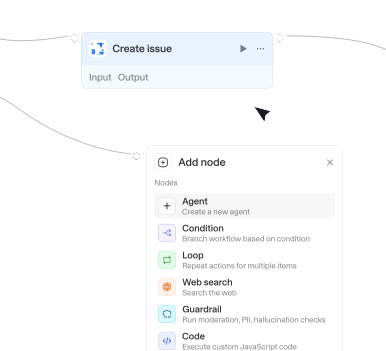
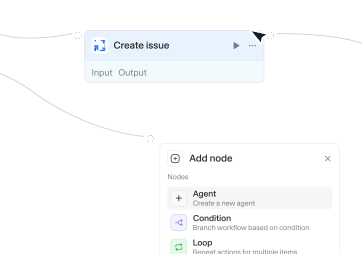
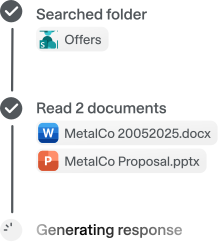
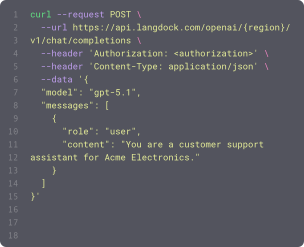
Wähle aus 56 verfügbaren Integrationen und 716 nativen Actions, um deine Agenten und Workflows zu erweitern.



Get knowledge bases
Lists available ServiceNow knowledge bases. Each knowledge base is a collection of articles organized by topic (e.g., IT Support, HR Policies, Facilities). Returns titles, descriptions, and sys_ids that can be used to scope searches in find_knowledge_articles.

Get knowledge file
Retrieves details of a specific file in a knowledge folder including its processing status and summary. Requires KNOWLEDGE_FOLDER_API scope.

Get lead conversion status
Checks the status of a lead-to-deal conversion and returns the resulting deal ID once it has completed.


Get manager
Returns the direct manager of a user by their ID or user principal name. Returns the manager's full profile, or indicates no manager is set.

Get marketing email
Gets the full details of a HubSpot Marketing Email including its content widget structure. Requires a marketing email ID (use 'List marketing emails' to find one). Returns the email's name, subject, state, full content object, sender details, and timestamps.

Get market insights indicator
Retrieves the data for a specific Statista Market Insights indicator using its unique identifier, optionally scoped to up to five geographies. Designed to work with results from the 'search_market_insights' tool - pass an indicator ID and, optionally, geo codes from that indicator's covered geographies. Always cite the source of the data in your response.
Get meeting
Retrieves a single HubSpot meeting by ID. Requires a meeting ID, obtainable from the Find meeting action. Returns the meeting title, description, internal notes, start/end times, location, outcome, owner, attendees, and external meeting URL.
Get meeting
Loads a meeting's title, owner, attendees, times, shared notes, and transcript. Pass meetingId from File added to folder, or paste the meeting UUID from the meeting page URL. Attendees come from the linked calendar event and do not include the owner; recordings without a calendar event return an empty attendee list. Requires a personal or workspace API key with Meetings Read API scope. The key can read meetings the key owner recorded or can access through sharing. Personal notes are never returned.


Get meeting summary
Gets the AI-generated summary of a past meeting (requires meeting summary to be enabled)

Get meeting transcript
Retrieves the transcript for a Microsoft Teams meeting using the join URL, meetingRecap URL, or conference ID. By default, returns transcript text in the transcripts array. Set 'Return as file' to true only when you need downloadable VTT file output.

Get merge request
Retrieves a single merge request by its project-scoped IID, optionally including its commits and pipelines.
Get merge request diffs
Gets the changed files and diffs for a merge request, by its project-scoped IID.

Get metadata
Retrieve all available dimensions and metrics for the property, including custom dimensions and metrics.


Get notebook
Gets the source content of a Databricks notebook. Accepts a workspace path or a notebook URL of the .../#workspace/<path> form.

Get order
Gets one order by its Shopify Order ID (line items, totals, discounts, addresses at city/country level, fulfillments). Customer email, phone, name, and street address are omitted without Protected customer data approval. The Order ID is not the order name or number (#1001) — run Find orders first and pass the returned id.

Get organization
Gets the full details of a single organization by ID, with custom fields resolved to their labels.

Get org unit
Retrieves an organizational unit (team or department) by ID. Get org unit IDs from list_employments or get_employment responses.

Get page
Retrieves a Confluence page's content and metadata, including its parent and immediate children. Returns cleaned XHTML in bodyContent by default. Set includeRawBody=true when using replace_page_text or rewriting a page that contains storage metadata, then pass the unmodified rawBodyContent to the relevant action so metadata is preserved. Pass bodyContent to update_page only when metadata preservation is not needed. For adding content at the bottom without rewriting, use append_to_page. Set removeHTMLTags=true for plain text output.

Get page
Read a SharePoint page and return its content, metadata, and layout. Only works with modern SharePoint pages.


Get page
Retrieves a specific Confluence page by its ID and returns a clean text-only body plus basic metadata (URL, title, timestamps). Always includes references (id, title, url) to the page's direct sub-pages; optionally also returns the sub-pages' full content.

Get page blocks
Retrieves the block structure of a Notion page or block, including block IDs, types, and text content. Requires a page or block ID. Returns a list of blocks with their types, content, and nested children up to the specified depth.
Get page content
Retrieves the full content of a Notion page or block, including all nested child blocks, and converts it to Markdown. Requires a page or block ID. Returns the page content as a Markdown string.
Get page details
Retrieves the metadata and properties of a specific Notion page. Requires a page ID or URL. Returns the page's properties, parent, icon, cover, and timestamps.
Get page hierarchy
Lists pages under a Confluence page recursively. Filters out folders and whiteboards.
Get pages
List pages using structured filters such as space, status, sort order, or specific page IDs. Best for browsing or listing pages rather than matching by text.
Get pages
Gets pages using structured filters like space, status, or sorting. Use this when users want to list/browse pages from specific spaces, get recent pages, or filter by criteria

Get parent goals for goal
Lists all parent goals for a specific goal. Requires a goal GID from get_goals. Returns parent goal GIDs and names

Get people
Lists Slack users in the workspace. Paginates through the full user list. By default each user includes id, real_name, profile.email, and profile.image_512. Only set includeFields when the user explicitly names additional fields to include in the response.
Get permission grant
Retrieves detailed properties of a specific delegated OAuth permission grant by its grant ID.
Get person
Gets the full details of a single contact person by ID, with custom fields resolved to their labels.

Get person profile
Retrieves a person's directory profile by email address, including job title, department, office location, and contact details.

Get person profile
Retrieves a person's directory profile by email address, including job title, department, office location, and contact details. Searches the organization directory — for personal Outlook contacts, use List contacts instead.

Get place details
Retrieves detailed information about a specific place including reviews, hours, contact info, and photos.

Get portfolio
Gets detailed portfolio data including owner, members, and custom fields. Requires a portfolio GID from get_portfolios. Returns full portfolio details
Get portfolio items
Lists items (projects) in a portfolio. Requires a portfolio GID from get_portfolios. Returns item GIDs, names, and resource types
Get portfolios
Lists portfolios filtered by owner, workspace, or team. Requires an owner user GID from get_users. Optionally accepts workspace GID from list_workspaces and team GID from get_teams_for_workspace. Returns portfolio GIDs and names

Get presentation
Read a Google Slides presentation's content as a slide map, full JSON, markdown, or plain text. This is the primary way to discover the OBJECT IDs you need for every edit: use outputFormat "map" to get a compact, ID-annotated index (per slide: slideId, layout, title, hasBody, and elementIds), then pass those exact IDs to edit/create actions. Use it before editing to locate slides and elements by ID, and after editing to verify the result. Never guess IDs or use slide numbers — read them from here.

Get priorities
Returns all issue priorities (id and name). Use this to map human-friendly names to IDs.
Get priorities
Returns all issue priorities (id and name). Use this to map human-friendly names to IDs.

Get processes
Lists automation processes (releases) in UiPath Orchestrator, optionally filtered by name and folder. Leave folder ID empty to list processes across accessible folders; scoping to Shared will miss processes published into a personal workspace or Solution folder.
Get product
Gets one product with its description, variants, prices, stock, media, and collection memberships. Use it before updating a product so the current values and variant IDs are known.
Get project
Gets detailed project data including dates and owner. Requires a project GID from get_projects. Returns full project details
Get project
Gets a single project by ID, including its board, phase, status, dates, description, owner, and linked deals, persons, and organizations.

Get project details
Gets the full details of a specific Linear project, including teams, members, and lifecycle dates.
Get projects
Lists projects in a workspace, optionally filtered by team. Requires a workspace GID from list_workspaces. Returns project GIDs and names
Get projects for team
Lists all projects for a specific team. Requires a team GID from get_teams_for_workspace. Returns project GIDs and names
Get projects for workspace
Lists ALL projects in a workspace across all teams. Requires a workspace GID from list_workspaces. Returns project GIDs, names, and resource types
Get project task counts
Gets task count statistics for a project (total, completed, incomplete, milestones). Requires a project GID from get_projects. Returns task counts by status



Get pull request
Gets an Azure Repos pull request by project, repository, and ID, or by pasting a pull request URL.


Get queue items
Lists work items from UiPath Orchestrator queues, optionally filtered by queue, status, or business reference. Use to inspect transaction items, find failed items, or look up an item by reference. Each item surfaces its failure reason (processing exception type and review status); enable Include details to also return its specific content, output, analytics, and full processing-exception details.
Get queues
Lists queues in UiPath Orchestrator, optionally filtered by folder and/or name. Returns each queue's name, ID, and its Specific Data JSON Schema (when defined). Use this to discover the queue required by other actions and the structure of the specific content expected by queue_job.
Get range
Retrieves data from a specified cell range in a worksheet. Use this to read data that is not in a table.
Get realtime users by device
Retrieves active users in the last 30 minutes broken down by device category (desktop, mobile, tablet).



Actions
Triggers
Actions
Triggers
Actions
Triggers
Actions
Triggers
Actions
Triggers
Actions
Triggers
Actions
Triggers
Actions
Triggers
Actions
Triggers
Actions
Triggers
Actions
Triggers
Actions
Triggers
Actions
Triggers
Actions
Triggers
Actions
Triggers
Actions
Triggers
Actions
Triggers
Actions
Triggers
Actions
Triggers
Actions
Triggers
Actions
Triggers
Actions
Triggers
Actions
Triggers
Actions
Triggers
Actions
Triggers
Actions
Triggers
Actions
Triggers
Actions
Triggers
Actions
Triggers
Actions
Triggers
Actions
Triggers
Actions
Triggers
Actions
Triggers
Actions
Triggers
Actions
Triggers
Actions
Triggers
Actions
Triggers
Actions
Triggers
Actions
Triggers
Actions
Triggers
Actions
Triggers
Actions
Triggers
Actions
Triggers
Actions
Triggers
Actions
Triggers
Actions
Triggers
Actions
Triggers
Actions
Triggers
Actions
Triggers
Actions
Triggers
Actions
Triggers
Actions
Triggers
Actions
Triggers
Actions
Triggers
Actions
Triggers
Actions
Triggers
Actions
Triggers
Actions
Triggers
Actions
Triggers
Actions
Triggers
Actions
Triggers
Actions
Triggers
Actions
Triggers
Actions
Triggers
Actions
Triggers
Actions
Triggers
Actions
Triggers
Actions
Triggers
Actions
Triggers
Actions
Triggers
Actions
Triggers
Actions
Triggers
Actions
Triggers
Actions
Triggers
Actions
Triggers
Actions
Triggers
Fragen & Antworten
Was kann ich mit Langdock‑Integrationen machen?
Integrationen verbinden Langdock mit deinen bestehenden Tools, sodass Agents und Workflows interne Dokumente durchsuchen, Aktionen auslösen, Daten aktualisieren oder Abläufe in deinen Apps automatisieren können.
Welche Tools kann ich mit Langdock integrieren?
Langdock unterstützt eine große Bandbreite gängier Business‑Tools wie Google Drive, Notion, Confluence, Slack, Salesforce, Jira, Asana und viele mehr. Du kannst zudem individuelle Integrationen für jedes Tool erstellen, das eine API anbietet.
Muss ich eigene Integrationen entwickeln?
Das ist nicht notwendig. Die meisten Verbindungen funktionieren sofort nach der Aktivierung. Wenn du jedoch erweiterte Funktionen oder Actions benötigst, bietet Langdock einen integrierten Builder an. Damit erstellst du deine eigene Logik – inklusive unterstütztem JavaScript-Flow.
Sind Integrationen sicher?
Absolut. Langdock nutzt eine sichere Authentifizierung (inklusive OAuth 2.0), verwahrt Zugangsdaten geschützt und führt eigenes Code‑Handling in einer isolierten Sandbox‑Umgebung aus. Zusätzlich ist Langdock ISO 27001‑zertifiziert, SOC 2 Type II-geprüft und vollständig DSGVO‑konform.
Wie nutze ich Integrationen in einem Chat oder Agenten?
Sobald eine Integration verbunden ist, kannst du sie in jedem Chat direkt nutzen, indem du @ eingibst und verfügbare Actions auswählst. Außerdem können Agenten dank ihrer Anweisungen Integrationen automatisch ausführen.