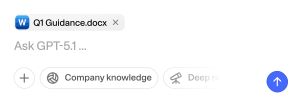
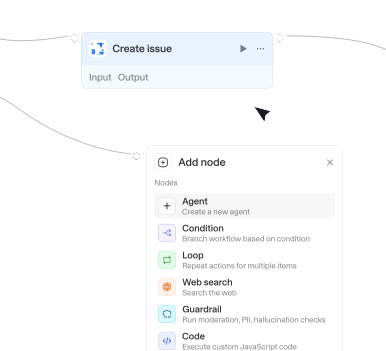
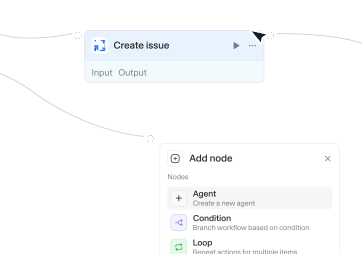
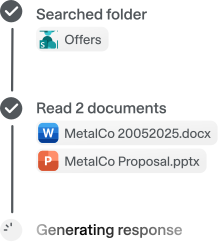
Power your agents and workflows with 57 available integrations and 754 native actions.


Get record
Gets a single Dataverse record by its GUID from a specified entity set, with optional column selection and related-record expansion.

Get record
Fetches a single record by its ID. Requires a base ID, table name, and record ID. Returns the record's fields and metadata. Optionally resolves linked records into full objects.


Get release
Retrieves detailed information about a specific release by its ID, including release notes and downloadable assets.
Get release by tag
Retrieves detailed information about a release by its tag name (e.g., v1.0.0). More intuitive than ID lookup when the tag is known.
Get repository content
Lists files and directories in a repository path. Use this to browse the structure of a repository before retrieving specific files.


Get repository content
Lists files and directories at a path in a project's repository tree. Use this to browse structure before reading a file.

Get resource
Gets one Azure control-plane resource by its full ARM resource ID. Returns identity, sku, tags, and the resource properties bag with secret-named keys and SAS-like values removed. Does not GET app settings, keys, or other secret-bearing child paths.

Get room availability
Checks whether a meeting room is free or busy during a specific time window, given its mailbox email address.



Get semantic model measures
Gets measures (name, table, and DAX expression when permitted) from a Power BI semantic model using the XMLA endpoint. Call this whenever the user asks for measures, DAX measures, or KPIs; Get dataset schema does not include them. The complete catalog is always attached as a JSON file; the inline list is a preview of the first 3 items. When the user wants a full semantic model, to describe a dataset including measures and joins, or to ground DAX, also call Get dataset schema and Get semantic model relationships. Dataset accepts a name, URL, or ID; search_datasets if the name is ambiguous. Requires Premium Per User (PPU), Premium capacity, or Fabric capacity with XMLA endpoint enabled.
Get semantic model relationships
Gets relationships with from/to table and column names from a Power BI semantic model using the XMLA endpoint. Call this whenever the user asks how tables join or relate; Get dataset schema does not include relationships. The complete catalog is always attached as a JSON file; the inline list is a preview of the first 3 items. When the user wants a full semantic model, to describe a dataset including measures and joins, or to ground DAX, also call Get dataset schema and Get semantic model measures. Dataset accepts a name, URL, or ID; search_datasets if the name is ambiguous. Requires Premium Per User (PPU), Premium capacity, or Fabric capacity with XMLA endpoint enabled.
Get sensitivity label
Get the sensitivity label(s) applied to a file and its protection state. Returns label IDs, assignment method, and whether the file is encrypted (Purview/Azure RMS) and so can't be read.



Get shop details
Gets the store's name, contact details, domains, currency, timezone, and plan. Use it to confirm which store a connection points at, or to read the store's currency before writing prices.


Get spaces
Lists all spaces in the Confluence workspace. Use this action when the user asks for available spaces, or when you need to look up a space ID by name or key before calling other actions.

Get spreadsheet metadata
Retrieves essential spreadsheet metadata including title, locale, timezone, and sheet properties (IDs, names, dimensions).


Get SQL result
Fetches the status and result of a SQL query that was submitted with 'Run SQL query'. Use this to check back on a query that was still running.

Get stage
Gets a single deal stage by its ID, including its name, pipeline, order, and win probability.

Get statistics data by ID
Retrieves detailed statistical information for a specific Statista chart or dataset using its unique identifier, including full numerical values, source details, and metadata. Works with results from the 'search_statistics' tool - pass an ID from a search result to dive deeper. Always cite the source of the data in your response.

Get stories for task
Gets task activity history including comments, status changes, and system events. Requires a task GID from search_tasks or typeahead_search. Returns stories with text, author, and timestamps
Get story
Gets a single story (comment or event) by its GID. Requires a story GID from get_stories_for_task. Returns the full story details

Get subscription
Retrieves detailed subscription information including current period, items, and products.
Get table metadata
Retrieves detailed metadata for a specific table including description, columns with their types and comments, owner, and tags. Essential for data discovery.
Get table rows
Retrieves rows from a table with pagination support, including the table name. Use this to read data from Excel tables.
Get table schema
Returns the field names, types, and options for a single table. Requires a base ID and table ID. Call this before searching or creating records to know the exact field names.
Get tags in workspace
Lists all tags in a workspace. Requires a workspace GID from list_workspaces. Returns tag GIDs and names

Get task
Gets full task details including assignee, dates, custom fields, and memberships. Requires a task GID from search_tasks or typeahead_search. Returns complete task data



Get task
Returns detailed information about a task including its description, status, dates, and assignees.

Get tasks
Lists tasks filtered by project, section, tag, workspace, or user task list. Requires at least one context filter (e.g. a project GID from get_projects). Returns task GIDs and names

Get teams for user
Lists teams a user belongs to within an organization. Requires a user GID from get_users and an organization GID from list_workspaces. Returns team GIDs and names
Get teams for workspace
Lists all teams in a workspace. Requires a workspace GID from list_workspaces. Returns team GIDs and names

Get thread replies
Retrieves all replies in a specific Slack thread. Use this to fetch thread content reliably. Get the channelId and threadTs from 'Get conversation history' or 'Search messages' results (use the thread_ts_unix field).
Get ticket context
Retrieves ticket pipelines, stages, and available properties to help with ticket creation and updates.

Get ticket conversation log
Gets a specific ticket by ID along with its complete conversation history and logs.
Get timelogs
Retrieves time tracking entries. Filter by task, folder, user, or date range. Returns total hours worked.

Get today's events
Retrieves all calendar events for today from your calendar or a shared calendar. Times are automatically displayed in the user's configured timezone. Use this for 'what's on my calendar today?' or 'do I have meetings today?' queries.

Get usage
Retrieves current usage information for your DeepL API account including character counts and limits.
Get user
Gets detailed user information. Accepts a user GID, email address, or "me" for the authenticated user. Returns name, email, photo, and workspace memberships

Get user availability
Gets busy times for the authenticated user within a date range. Shows when the user is unavailable.
Get users
Lists users in a workspace, optionally filtered by team. Requires a workspace GID from list_workspaces. Returns user GIDs, names, and emails

Get users
Lists all users in the Notion workspace, including their IDs, names, emails, and types (person or bot). Use this to find a specific person's user ID for filtering, assigning, or mentioning.

Get users
Lists Monday.com users with optional filters. Requires no inputs by default; optionally filter by user IDs, emails, or name search. Returns each user's ID, name, email, title, and admin/guest status.

Get versions
Lists all release versions for a Jira project. Use this to look up version IDs before creating issues, updating fixVersions on tickets, or building release workflows. Supports filtering by status (released, unreleased, archived).
Get versions
Lists all release versions for a Jira project. Use this to look up version IDs before creating issues, updating fixVersions on tickets, or building release workflows. Supports filtering by status (released, unreleased, archived).

Get view by path
Gets views with a given viewUrlName. viewUrlName is not site-wide unique, so check count/isAmbiguous and use workbook or project context when multiple views are returned.
Get view image
Returns a PNG snapshot of a Tableau view as an image attachment. Use this to show a chart or dashboard inline.


Assignee assigned
Triggers when an issue is assigned to someone, and again when it is reassigned to a different person. Optionally scope to a single team.

Call ended
Triggers when a Google Meet call ends, so you can fetch the transcript, send follow-ups, or log the call.
Changed activity
Triggers when an activity is created or updated. You can additionally filter any event to records where a specific field matches given value(s).
Changed deal
Triggers when a deal is created or updated. You can additionally filter any event to records where a specific field matches given value(s) (e.g. Updated with status = won to react to deals becoming won).
Changed lead
Triggers when a lead is created or updated. You can additionally filter any event to records where a specific field matches given value(s).
Changed note
Triggers when a note is created or updated. You can additionally filter any event to records where a specific field matches given value(s).
Changed organization
Triggers when an organization is created or updated. You can additionally filter any event to records where a specific field matches given value(s).
Changed person
Triggers when a person is created or updated. You can additionally filter any event to records where a specific field matches given value(s).
Changes in path
Triggers when files are added or modified in a specific path. Useful for CI/CD pipelines, config monitoring, code review automation, or content tracking.
Changes in path
Triggers when files under a specific path change in a project. Useful for docs or config sync workflows.

File added to folder
Starts when a file or meeting is uploaded or moved into the selected Library folder. Existing contents and edits do not trigger. Connect a personal or workspace API key with Workflow API scope. Personal keys use their owner's folder access. Workspace keys can access folders shared with the key or everyone in the workspace. Use Read folder file for the file, or Get meeting with meetingId for owner, attendees, notes, and transcript.
File updated
Triggers when a file is updated in a SharePoint folder. Re-fires each time a file's contents change, and optionally filter by name or file extension.
Issue state changed
Triggers when an issue moves to a different workflow state (e.g. Todo to In Progress, or In Progress to Done). Does not fire on issue creation. Optionally scope to a single team or workflow state.

Job ended
Triggers when a UiPath Orchestrator job reaches a terminal state (Successful, Faulted, or Stopped). Use to react to finished automations, for example to notify on failures or to process a job's output once it completes.

Label changed on email
Triggers when categories are added to or removed from an email in your Outlook mailbox.
Label changed on email in shared inbox
Triggers when categories are added to or removed from an email in a shared inbox (an owner you have Mail.Read.Shared access to).
New automation idea
Triggers when a new automation idea is created or submitted in Automation Hub. Event data includes newPhase / newStatus (initial pipeline values). Optionally filter by phase, status, category, or application.
New email in shared inbox
Triggers when new emails are received in specified shared inboxes (users you have Mail.Read.Shared access to).
New email in shared mailbox folder
Triggers when emails appear in a specific folder of a shared mailbox (either newly received or moved to it). Requires Mail.Read.Shared permission and folder access.
New email in specific folder
Triggers when emails appear in a specific folder (either newly received or moved to it).

New email matching search
Triggers when new emails matching your search query are received (sent emails excluded unless you add 'in:sent').

New event matching search
Triggers when new calendar events matching the specified search query are created.
New event matching search
Triggers when new calendar events matching the specified search query are created.

New issue
Triggers when a new issue is created in the repository. Does not trigger for pull requests.
New item created
Triggers when a new file or folder is created in a SharePoint folder. Watch files, folders, or both, and optionally filter by name or file extension.

New meeting transcript
Triggers when a transcript becomes available for a recently ended Teams meeting.
New message by search
Triggers when a new message is found by searching for a specific keyword or other criteria.
New message in channel
Triggers when a new message was posted in a channel (public, private, DM, etc.).
New message in conversations
Triggers when a new message is posted in a specific conversation (DM, group DM, or channel).

New message with tag
Triggers when a specific user is @-mentioned in a Viva Engage community, in either a thread starter or a reply.
New reaction in channel
Triggers when someone reacts to a channel message or a reply in its thread. Optionally filter to one reaction type (Unicode emoji like 👍, or a display name like Like). Requires ChannelMessage.Read.All on the connection (granted when a channel-message action such as Get channel messages is enabled).
New reaction in chat
Triggers when someone reacts to a message in a Teams chat (1:1 or group). Optionally filter to one reaction type (Unicode emoji like 👍, or a display name like Like). Requires Chat.ReadWrite on the connection (granted when a chat-message action such as Get chat messages is enabled).
Property changed
Triggers when a property on a HubSpot object (a standard object like a contact, company, deal, or ticket, or a custom object) changes. Watching a specific property fires once per value transition and returns the new value under a key named new_ followed by the property name (e.g. new_dealstage when watching dealstage). Leave the property name empty to fire on any update to the object instead.
Updated automation idea
Triggers when an automation idea is updated (phase/status moves or other edits). Does not fire on create. Event data includes newPhase / newStatus (current values after the update); oldPhase / oldStatus are null because the Open API does not expose prior values. To watch ideas going Live, set Phase ID to your tenant's Live phase ID from a Search automation ideas card.
Updated issue
Triggers when an existing Jira issue is modified (e.g., status change, field edit, reassignment). Does not fire for newly created issues — use "New issue" for that.
Actions
Triggers
Actions
Triggers
Actions
Triggers
Actions
Triggers
Actions
Triggers
Actions
Triggers
Actions
Triggers
Actions
Triggers
Actions
Triggers
Actions
Triggers
Actions
Triggers
Actions
Triggers
Actions
Triggers
Actions
Triggers
Actions
Triggers
Actions
Triggers
Actions
Triggers
Actions
Triggers
Actions
Triggers
Actions
Triggers
Actions
Triggers
Actions
Triggers
Actions
Triggers
Actions
Triggers
Actions
Triggers
Actions
Triggers
Actions
Triggers
Actions
Triggers
Actions
Triggers
Actions
Triggers
Actions
Triggers
Actions
Triggers
Actions
Triggers
Actions
Triggers
Actions
Triggers
Actions
Triggers
Actions
Triggers
Actions
Triggers
Actions
Triggers
Actions
Triggers
Actions
Triggers
Actions
Triggers
Actions
Triggers
Actions
Triggers
Actions
Triggers
Actions
Triggers
Actions
Triggers
Actions
Triggers
Actions
Triggers
Actions
Triggers
Actions
Triggers
Actions
Triggers
Actions
Triggers
Actions
Triggers
Actions
Triggers
Actions
Triggers
Actions
Triggers
Actions
Triggers
Actions
Triggers
Actions
Triggers
Actions
Triggers
Actions
Triggers
Actions
Triggers
Actions
Triggers
Actions
Triggers
Actions
Triggers
Actions
Triggers
Actions
Triggers
Actions
Triggers
Actions
Triggers
Actions
Triggers
Actions
Triggers
Actions
Triggers
Actions
Triggers
Actions
Triggers
Actions
Triggers
Questions & answers
What can I do with Langdock integrations?
Integrations let you connect Langdock to your existing tools so your agents and workflows can search documents, trigger actions, update data, or automate workflows across your apps.
Which tools can I integrate with Langdock?
Langdock supports a wide range of popular workplace tools like Google Drive, Notion, Confluence, Slack, Salesforce, Jira, Asana, and more. You can also build fully custom integrations for any API‑enabled tool.
Do I need to build my own integrations?
You don’t have to. Many integrations are plug‑and‑play. But if you want custom functionality or custom actions, Langdock includes a built‑in integration builder that makes it easy to create your own integration logic with guided JavaScript support.
Are integrations secure?
Absolutely. Langdock uses secure authentication (including OAuth 2.0), handles credentials safely, and runs custom code in a sandboxed environment. Langdock is also ISO 27001 certified, SOC 2 Type II audited, and GDPR compliant.
How do I use integrations inside a chat or agent?
Once connected, you can use integrations directly in any chat by typing @ to trigger available actions. Agents can also call integrations automatically based on their instructions.