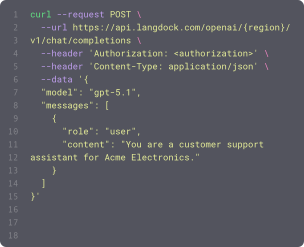
Power your agents and workflows with 57 available integrations and 754 native actions.


Draft marketing email
Drafts a new HubSpot Marketing Email. Requires a name for the email. Returns the drafted email's ID, name, subject, state, and creation timestamp.

Draft reply to message
Creates a draft reply for review (does NOT send) — use when the user wants to draft, prepare, or save a reply for review before sending. Use the toggle to choose Reply (sender only) or Reply all (sender and all recipients); use 'send_reply' instead to send the reply immediately.
Draft reply to message in shared mailbox
Creates a draft reply in a shared mailbox for review (does NOT send) — the draft appears in the shared mailbox's Drafts folder. Use the toggle to choose Reply (sender only) or Reply all (sender and all recipients); use 'send_reply_from_shared_mailbox' instead to send the reply immediately.

Duplicate slide or element
Duplicate an existing slide (with all its content) or a single page element (shape, text box, table, image, or line) within the same presentation; the copy is inserted directly after the original. Use it for templating - build one polished slide, then duplicate it per section and customize each copy. ID flow: pass the OBJECT ID of the slide/element to duplicate (from get_presentation or the action that created it). The API auto-generates new IDs for the copy and its children and only returns the new top-level ID, so optionally supply idMappings to assign your own predictable IDs and edit the copy immediately without a follow-up get_presentation. Returns the new top-level object ID plus the full old-to-new ID map.
Edit shape text
Edits the text of an existing shape, text box, or table cell on a slide — replace all text, replace a specific character range, or insert text at a position. Use it to fill placeholders or update copy after a shape exists. You must pass the element's exact object ID in `elementId`: get it from the action that created the element (add_shape_with_text, add_table, etc., which return the id they used) or from get_presentation (outputFormat "map" or "json"). Never invent an ID and never pass a slide number.
Edit speaker notes
Write, append to, or clear the speaker notes for one slide (the presenter-facing 'Notes' area below the slide), not the visible on-slide text. Use it to draft what the presenter should say, add talking points to a slide you just created, or wipe outdated notes. Operates on a single slide identified by its slide OBJECT ID. ID flow: pass the presentationId from the URL and the slide's objectId (from create_slide / build_deck_from_outline output, or get_presentation outputFormat 'map'); the action automatically locates the speaker-notes shape on that slide, so you never supply the notes shape ID yourself.
Embed Sheets chart
Embed an existing chart from a Google Sheets spreadsheet onto a slide as either a LINKED chart (stays connected to the Sheet so it can be refreshed with the latest data) or a NOT_LINKED_IMAGE (a static, non-refreshable snapshot). Use it to drop a Sheets-built chart into a deck instead of recreating the data in Slides. You must have at least view access to the source spreadsheet (the Slides API reads it on your behalf). ID flow: pass the presentationId from the URL, the slide's OBJECT ID (not its number — get it from get_presentation outputFormat "map", or from create_slide / build_deck_from_outline), the spreadsheetId, and the INTEGER chartId from inside that Sheet (0, 1, 2, …) — NOT a Slides object ID. Returns the embedded chart's object ID (objectId / chartObjectId) and whether it is linked, so you can later refresh, move, resize, or delete it.

Execute GraphQL mutation
Executes one GraphQL mutation operation that can change Fabric data. Use Inspect GraphQL schema first to identify the available mutation.
Execute GraphQL query
Executes one GraphQL query operation. Use Inspect GraphQL schema first when the operation's fields, return type, filters, or selection shape are not already known; do not use this action for introspection.

Execute query
Run DAX queries, DMVs, MDX queries, or INFO DAX functions against a Power BI dataset. Results with more than 50 rows are returned as a CSV file to preserve full data for analysis. DAX queries on standard datasets use the Execute Queries API. Live connection/Azure Analysis Services datasets, DMVs, MDX queries, and INFO DAX functions use XMLA endpoint.


Export paginated report (initiate)
Initiates a Power BI paginated report export job. Supports more formats than regular reports including XLSX, CSV, DOCX, XML. Returns export ID for use with fetch action.
Export presentation
Export an entire Google Slides deck as a downloadable file and return it to the user — PDF (preserves exact layout/visuals; best for sharing or printing), PPTX (editable PowerPoint), or TXT (plain-text extraction of all slide text). Use this when the user wants to download, save, share, or convert a whole deck. The file is named after the presentation title (e.g. 'My Deck.pdf'). This action consumes only the presentationId (no slide or element IDs); take the presentationId from the URL or from the presentationId returned by create_presentation / copy_presentation. Note: Google's Drive export endpoint caps exports at 10MB — very large decks return an actionable error suggesting TXT or a manual download.
Export report to file (fetch)
Fetches a Power BI report export (regular or paginated) by checking status and downloading the file if ready.
Export report to file (initiate)
Initiates a Power BI report export job. Returns export ID for use with fetch action.

Export usage
Exports workspace usage data for the given date range. Pick the dataset (agents, assistants, users, workflows, projects, or models) and a from/to range; returns the matching records inline. Requires USAGE_EXPORT_API scope.
Export workflow runs
Exports workflow run and node execution data for a date range as flattened rows, one per node execution. Returns rows inline by default; results over 50 rows are returned as an attached CSV (same pattern as Power BI query results). Enable Return as CSV to force a file for smaller exports. Requires an API key with the WORKFLOW_API scope and workflow owner, editor, or workspace admin access.

Find account
Searches accounts by name or keyword (full-text search). For filtering by owner, industry, or any field, or to list all accounts, use Execute SOQL query instead.

Find chats
Searches existing Microsoft Teams chats by topic or by another participant's name or email. Searching for the signed-in user adds Notes (48:notes) when no chat-type filter is set; the signed-in user is not matched as a participant.
Find collections
Finds collections and reports which ones accept manual product changes. Use it to get the collection IDs needed to add or remove products.

Find components
Returns a paginated list of components for one or more projects. Use this to discover component IDs before creating or updating issues with components.
Find components
Returns a paginated list of components for one or more projects. Use this to discover component IDs before creating or updating issues with components.
Find contract
Finds contracts. Two modes: (1) text search on indexed Contract fields when 'Search Term' is provided (>=2 chars, no wildcards alone); (2) filter-only query when 'Where' is provided without a search term (use this for AccountId, Status, or date filters). At least one of the two must be set.
Find custom object
Searches for records in a HubSpot custom object. Supports full-text search, filters, sorting, and property selection. Use 'Get custom object context' to discover filterable property names.

Find databases
Searches for Notion databases by title across the workspace. Requires a search query string. Returns a list of matching databases with their IDs, titles, and URLs.

Find deal
Searches deals by a free-text term, optionally restricted to specific fields, exact-matched, scoped by status, person, or organization, and post-filtered by value range.
Find discount codes
Finds code-based discounts with their codes, status, usage, and validity window. Automatic discounts are not included because they have no code to hand to a customer.
Find email
Search email engagement records by subject. Returns the most recent emails first, including subject, sender, recipients, direction, status, and body. Body text is returned but is not searchable.


Find knowledge articles
Searches the ServiceNow knowledge base for information. Use this whenever the user asks about information that could be documented in the ServiceNow knowledge base. Returns article titles, numbers, states, categories, and knowledge base names. Use get_knowledge_article to then retrieve the full article body.
Find lead
Finds and filters leads by a title term, linked person, organization or owner, value range, currency, labels, expected-close window, a custom-field match, or a saved filter. Sortable by date added or updated.
Find meeting
Searches for meetings in HubSpot. Accepts an optional search query, filters (date range, outcome, owner), and sort order. Returns a list of meetings including titles, notes, descriptions, start/end times, outcomes, and owner IDs.

Find meeting times
Finds available meeting times for yourself and additional participants. Checks free/busy schedules and suggests optimal time slots within the specified window.
Find opportunity
Searches opportunities by name or keyword (full-text search). For filtering by owner, stage, close date, or any field, or to list all opportunities, use Execute SOQL query instead.
Find orders
Finds recent orders by keyword, payment status, or fulfillment status, and returns each order's Shopify Order ID, name (for example #1001), totals, and status. Customer email/phone/name are not returned (Protected customer data). Use the returned id with Get order or Fulfill order. Shopify only exposes an app's recent orders (roughly the last 60 days).
Find organization
Searches organizations by a free-text term, optionally restricted to specific fields (name, address, notes, custom fields) and exact-matched.
Find pages
Searches for Notion pages by title across the workspace. Requires a search query string. Returns a list of matching pages with their IDs, titles, and URLs.
Find products
Finds products by keyword, vendor, product type, tag, or status, and returns their IDs, prices, and stock totals. Use it to locate the product IDs that the other product actions need.

Find records
Searches for records in a table with optional filtering. Requires a base ID and table name. Always call Get table schema first to get the exact field names. Returns matching records with their fields.
Find records (advanced)
Executes advanced querys on supported Salesforce objects based on SOQL queries.
Find rooms
Lists conference rooms and meeting spaces in the organization with details including capacity, building, floor, and equipment.
Find site users
Finds a person in a SharePoint site and looks up their site user ID. Requires the site ID and the person's email address or exact display name, and only finds people who already have access to that site. Returns the person's site user ID (the LookupId) with their display name, email address and login name; this ID is what a Person or Group column expects when it is set with create_list_item or update_list_item.

Flag email
Flags an email in your mailbox for follow-up, marks a flag complete, or clears it. Optionally set start and due dates to add a reminder. Complements the flagged filter in Search own emails.
Flag email in shared mailbox
Flags an email in a shared mailbox for follow-up, marks a flag complete, or clears it. Optionally set start and due dates to add a reminder. Requires membership in the shared mailbox or delegated access.
Format text
Applies formatting styles like bold, italic, underline, font size, or color to all occurrences of a text string in a Google Docs document
Forward email from shared mailbox
Forwards an email from a shared mailbox (e.g., support@company.com) to one or more recipients with optional comment.
Fulfill order
Marks an order's remaining items as fulfilled and optionally records tracking details and notifies the customer. Requires a Shopify Order ID from Find orders (not the order name/number).


Get absence period
Retrieves an absence period by ID. Get absence period IDs from list_absence_periods or create_absence responses.


Get account context
Gets all fields and metadata for the Account object, plus the org's Account record types with their IDs, whether each one creates a Person Account (isPersonType) and whether the connected user may use it (available). Use this to find the record type ID needed to create a Person Account, since those IDs differ per org.
Get action
Retrieves a single integration action with its full details, including source code, input fields, and confirmation flag. Prefer this over get integration with includeDetails when you only need one action — large integrations can exceed context limits when every action's code is returned together.

Actions
Triggers
Actions
Triggers
Actions
Triggers
Actions
Triggers
Actions
Triggers
Actions
Triggers
Actions
Triggers
Actions
Triggers
Actions
Triggers
Actions
Triggers
Actions
Triggers
Actions
Triggers
Actions
Triggers
Actions
Triggers
Actions
Triggers
Actions
Triggers
Actions
Triggers
Actions
Triggers
Actions
Triggers
Actions
Triggers
Actions
Triggers
Actions
Triggers
Actions
Triggers
Actions
Triggers
Actions
Triggers
Actions
Triggers
Actions
Triggers
Actions
Triggers
Actions
Triggers
Actions
Triggers
Actions
Triggers
Actions
Triggers
Actions
Triggers
Actions
Triggers
Actions
Triggers
Actions
Triggers
Actions
Triggers
Actions
Triggers
Actions
Triggers
Actions
Triggers
Actions
Triggers
Actions
Triggers
Actions
Triggers
Actions
Triggers
Actions
Triggers
Actions
Triggers
Actions
Triggers
Actions
Triggers
Actions
Triggers
Actions
Triggers
Actions
Triggers
Actions
Triggers
Actions
Triggers
Actions
Triggers
Actions
Triggers
Actions
Triggers
Actions
Triggers
Actions
Triggers
Actions
Triggers
Actions
Triggers
Actions
Triggers
Actions
Triggers
Actions
Triggers
Actions
Triggers
Actions
Triggers
Actions
Triggers
Actions
Triggers
Actions
Triggers
Actions
Triggers
Actions
Triggers
Actions
Triggers
Actions
Triggers
Actions
Triggers
Actions
Triggers
Actions
Triggers
Actions
Triggers
Questions & answers
What can I do with Langdock integrations?
Integrations let you connect Langdock to your existing tools so your agents and workflows can search documents, trigger actions, update data, or automate workflows across your apps.
Which tools can I integrate with Langdock?
Langdock supports a wide range of popular workplace tools like Google Drive, Notion, Confluence, Slack, Salesforce, Jira, Asana, and more. You can also build fully custom integrations for any API‑enabled tool.
Do I need to build my own integrations?
You don’t have to. Many integrations are plug‑and‑play. But if you want custom functionality or custom actions, Langdock includes a built‑in integration builder that makes it easy to create your own integration logic with guided JavaScript support.
Are integrations secure?
Absolutely. Langdock uses secure authentication (including OAuth 2.0), handles credentials safely, and runs custom code in a sandboxed environment. Langdock is also ISO 27001 certified, SOC 2 Type II audited, and GDPR compliant.
How do I use integrations inside a chat or agent?
Once connected, you can use integrations directly in any chat by typing @ to trigger available actions. Agents can also call integrations automatically based on their instructions.