Changelog
We're constantly working on new features and improvements. Here's what's new with Langdock.
Chat Agent Builder

Creating a new agent in Langdock used to mean filling out a form: writing instructions, picking a model, connecting integrations, one field at a time. Now you can just describe what you want to build in plain language, and the agent builder will take care of the rest.
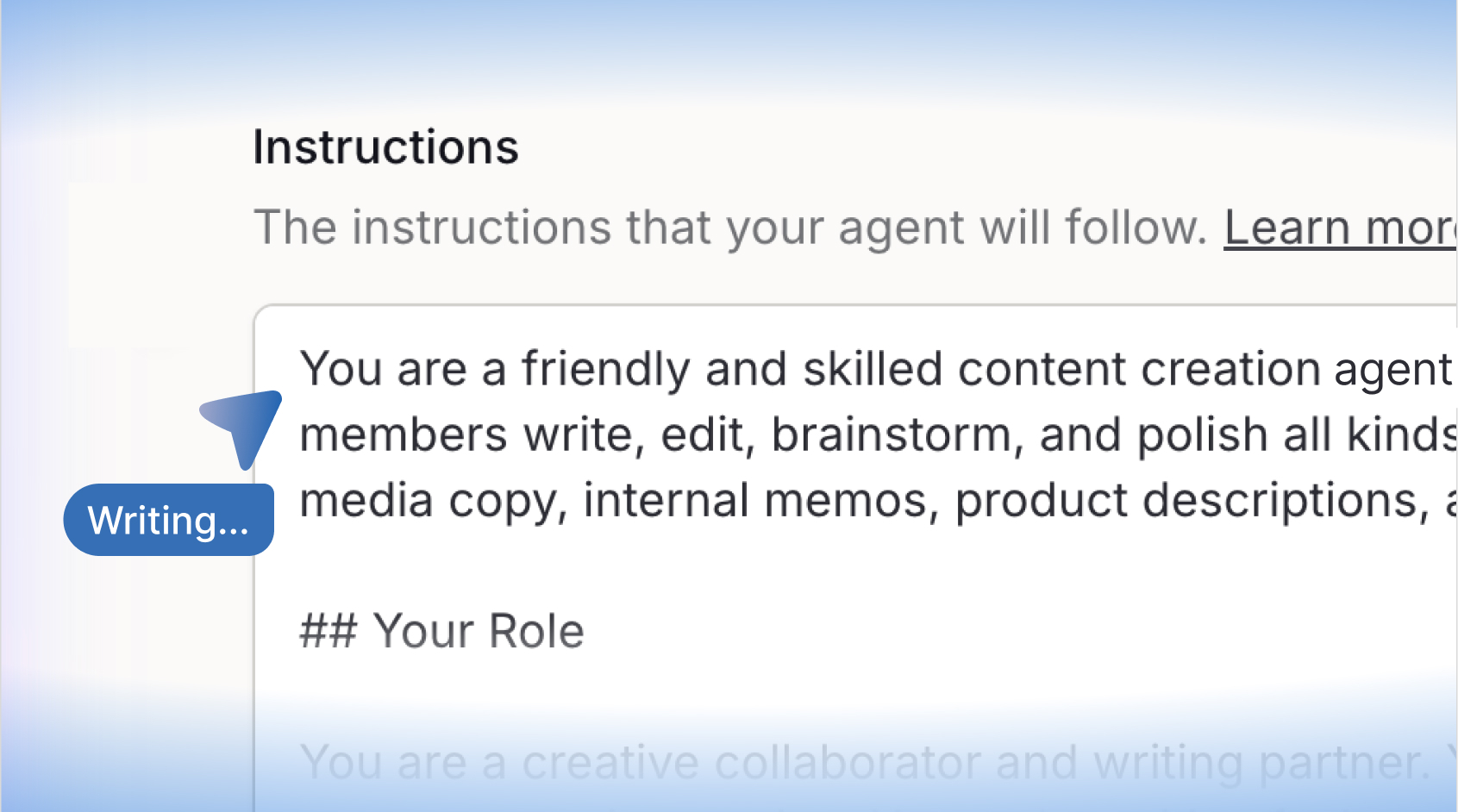
When you open the agent editor, you'll find a new conversational interface alongside the existing form. Tell it what your agent should do: "I want an agent that monitors my inbox and creates Jira issues from customer requests." It will propose a plan, ask any clarifying questions it needs, and then configure the agent for you: name, instructions, model settings, knowledge sources, integrations, sub-agents, and more.
What's new
Conversational agent creation and editing
Describe what you want to build in natural language. The builder proposes a plan, waits for your approval, then configures the agent (including instructions, model settings, knowledge, integrations, sub-agents, labels, and prompt suggestions) all at once. You can also use it to edit an existing agent: just tell it what you want to change.
Live preview as it builds
Changes stream into the agent editor in real time as the builder works, so you can see exactly what's being configured without waiting for it to finish.
Structured clarifying questions
When the builder needs more information before it can proceed, it asks focused, structured questions. You click through the options and it continues.
Visual feedback on active edits
A subtle overlay highlights the field currently being updated, so you always know what the builder is working on.
Workspace-aware suggestions
The builder has full context of your workspace. It knows which integrations you have connected, which knowledge bases are available, and which other agents exist, so it can make smart suggestions without you having to look anything up.
How to access it
The chat agent builder is available in the agent editor. When you create a new agent or open an existing draft, the builder chat appears on the left side of the editor.
Note: the preview chat used to test your agent has also moved to the left side of the editor, so both chat interfaces are now in one place.
We're excited for you to try it out!
- New interface languages: The Langdock web app is now fully available in French, Spanish, and Italian, providing a native-language experience for more users.
- Improved code canvas artifacts: Code canvas artifacts now show a live rendered preview on the card after generation, handle links correctly within the sandbox, and produce significantly better-looking output.
- Larger skill package uploads: You can now upload skill packages up to 20 MB, double the previous 10 MB limit.
- Visible errors for failed workflow trigger polls: Failed workflow trigger polls now surface as failed workflow runs with a clear error message, so you can easily identify and troubleshoot issues instead of them silently disappearing.
- More model options in Workflow Chat: Workflow Chat now supports Opus and reasoning/thinking models, including an extended-thinking toggle, giving you access to more powerful AI models directly within your workflow building experience.
- Search and filter in the Library: You can now search and filter folders and knowledge bases by name directly in the Library, making it faster to find what you need.
- Select all files in Library views: You can now select all files at once in Library views, including recent files, folders, and knowledge bases, making it faster to apply batch actions to your entire filtered file set.
- Visual understanding for images in Folders: Images uploaded to Folders can now be read and understood visually by the AI. Simply ask the model to describe or analyze an image after uploading it to a Folder.
- requiresConfirmation flag in the integrations API: The public integrations API now exposes the requiresConfirmation flag on actions, allowing API consumers to read and set whether a user confirmation is required before an action executes.
- Optional fields in action confirmation UI: You can now add and remove optional fields directly from the action confirmation UI when using integrations, giving you more flexibility to customize inputs before confirming an action.
- Custom creator display name for agents: Workspace admins can now set a custom creator display name for each agent. It appears on agent cards, the chat start screen, and agent info dialogs. This is useful when a larger team built an agent, and the name should reflect that rather than a single person. Admins can configure this in the agent settings.
Langdock for Excel
Today, we’re introducing Langdock for Excel, available on the Microsoft Marketplace. Langdock now lives directly inside Excel, so everything you need is right there in your spreadsheet.
Why we built this
Spreadsheets are where much of the work happens, but switching between Excel and a separate tool breaks the flow. Copying data back and forth, losing context, and constantly changing windows don’t scale when you’re trying to get real work done.
Langdock for Excel brings Langdock directly into Excel. You can read your workbook, write into it, and create new files with AI. Your existing Langdock integrations, agents, and skills are available without leaving your spreadsheet.
What you can do
- Ask questions about your workbook: get explanations of complex sheets, spot anomalies, or understand what a formula is doing without manually digging through cells.
- Create formulas, tables, charts, and pivot tables: describe what you need in plain language and let Langdock build it directly in your sheet.
- Clean and structure messy data: standardize names, dates, categories, or currencies before analysis.
- Summarize spreadsheet findings: turn data into clear text for reports, emails, presentations, or meetings.
- Save your work to the library: upload finished spreadsheets directly to your Langdock library so they’re always accessible when you or your team need them.
- Use Langdock features directly in Excel: knowledge bases, integrations, skills, and workflows are all available inside the plugin.
Availability
Workspace admins can enable Langdock for Excel at the bottom of the workspace integration settings. Once enabled, users can install it from the Microsoft Marketplace and start using Langdock directly in Excel.
You can check out our documentation to get started.
Claude Sonnet 5
Anthropic’s Claude Sonnet 5 is now available on Langdock! 🚀

Today, we are adding Claude Sonnet 5 to Langdock. It is Anthropic’s most agentic Sonnet model yet. It can make plans, use tools, and run autonomously at a level that previously required larger and more expensive models. Its performance is close to Opus 4.8, but at a lower price.
You can read more about the launch in Anthropic’s official announcement.
The model is hosted in the EU and available to all workspaces now.
To get you started quickly, we have automatically enabled Sonnet 5 in all workspaces where a previous Sonnet version was activated. Admins can manage model access in workspace settings.
Agent Evals
You can now test your agents before shipping them, directly inside the agent editor.
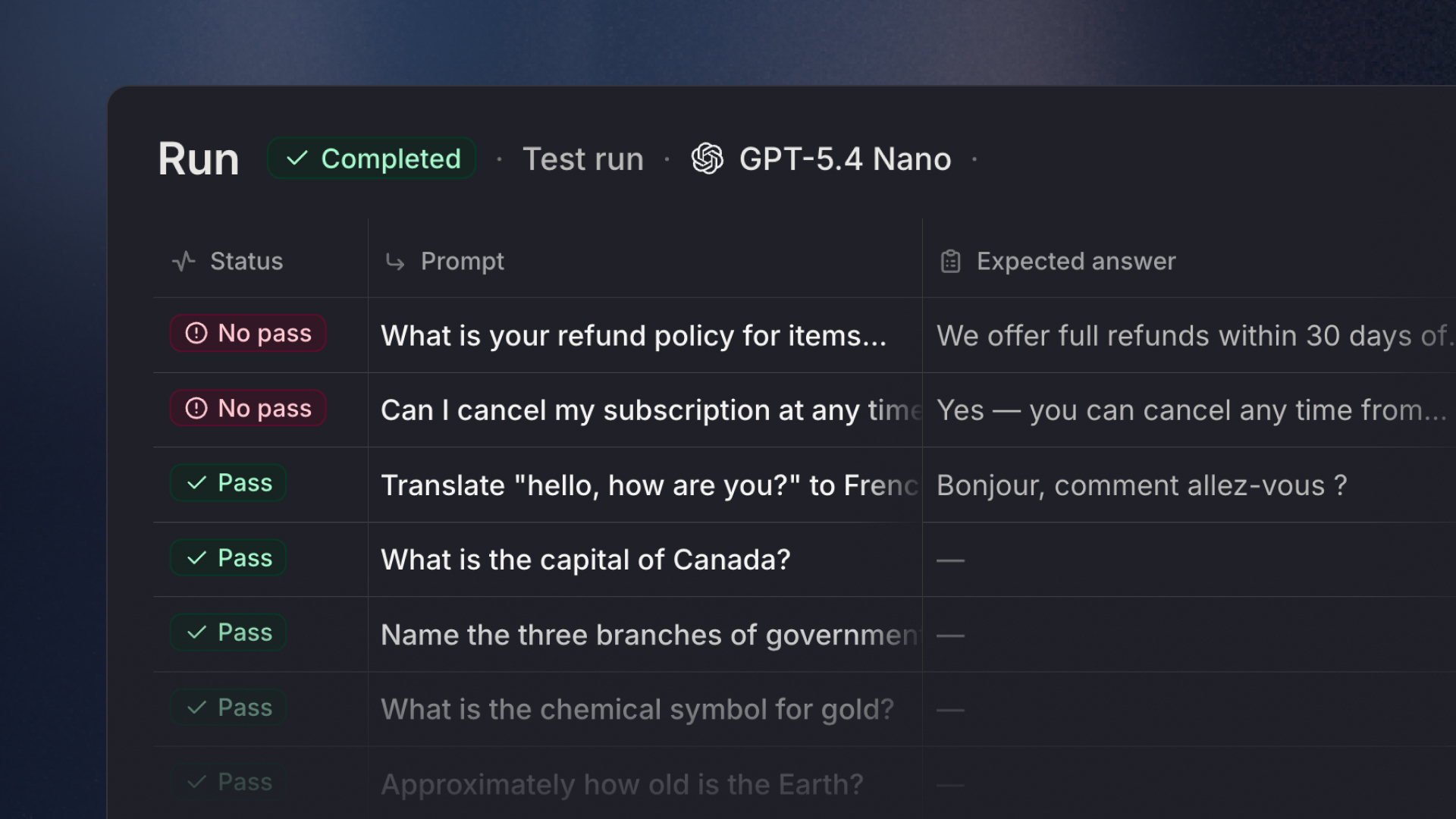
Agent Evals lets you define test sets with real prompts, set expectations for what a good answer looks like, and run them against your agent on demand. No more manual spot-checking after every update.
What's new
Test sets & test cases
Create one or more test sets per agent. Each test set holds a collection of test cases - a prompt paired with the criteria the agent's response must meet. You can add cases manually, edit them inline in a table view, or import them in bulk via CSV (a sample template is available to download).
Three ways to grade a response
- AI judge: Provide a reference answer or a rubric, and a model evaluates whether the agent's response passes. The judge returns pass, unsure, or fail.
- Tool use check: Specify which tools the agent should call. Pick from the agent's connected tools and actions using a built-in tool picker.
- Keyword check: Define words or phrases the response must mention or must not mention.
Choose your judge model
Each test set lets you pick which model grades the responses, independent of the model the agent itself uses.
Run and watch results live
Kick off a run from the Tests tab. Results stream in as cases complete. A cross-set timeline gives you a history of all past runs. Click any case in the results table to open a full detail view: the conversation, tool inputs and outputs, and the expected vs. actual answer side by side.
Run individual cases
You don't have to run an entire test set every time. Select one or more cases and run only those - useful when iterating on a specific prompt. Unselected cases are skipped and stay in the set.
Download results as CSV
Export any run's results as a CSV for analysis or sharing with stakeholders.
Safe tool execution
When running tests, tool calls that could have side effects (like writing data or sending messages) are executed in a safe mode by default, so you can test freely without worrying about unintended actions.
Note: Test runs count against your personal usage limits.
Where to find it
Open any agent in the editor and go to the Evals tab. The tab was previously visible but disabled, it's now fully available.
We'd love to hear how this fits into your workflow of building agents!
Work in Folders
Today, we are introducing Work in Folders, which gives your chat a working directory. Choose a folder, and Langdock can use the files inside it while creating, editing, and saving new work back to the same place.
Join our webinar
We will host a webinar on July 1st to walk you through the different ways to use files in Langdock. Get a first hand introduction to how files, knowledge bases, folders, templates, and the new document editor work in day-to-day use. Sign up here.
Why we built this
With the Library, we made it much easier to find and manage files in Langdock. Work in Folders takes the next step by bringing those files directly into the way you work with AI.
Instead of attaching files one by one or starting from an empty chat, you can select a folder and give Langdock the right context from the start. The same folder also becomes the place where new or edited files are saved, so folders are not just for storing work, but for actively working with it.
What's new
- Work from a folder in chat: Select "Work in a folder" before starting a task. Langdock can use the files inside to answer questions, summarize, compare, or create new work, while generated and edited files stay connected to the same folder.
- Collaborative folders: Folders can be shared with colleagues, groups, or your whole workspace, making them useful for teamwork, recurring tasks, and shared file collections.
- Use folders in Projects: Work in Folders is also available in Projects. Add a folder to give the Project lasting context, and keep new or edited outputs in the same place.
- Use folders in Agents: Folders are also available in Agents as read-only folders for now.
For example, to prepare for a customer meeting, put proposal notes, usage numbers, financials, call notes, and a presentation into one folder, then ask Langdock to turn it into a clear agenda or first draft. The context is already there, and the output lands right where you need it.
Folders and Knowledge Bases
This release also makes the difference between folders and knowledge bases clearer. The folders you already had in Langdock now appear as knowledge bases, while the new folders are built for active file work.
- Knowledge bases are read-only collections for semantic search, and reusable company knowledge across chats and agents. Existing folders keep their content and settings, but now appear as Knowledge Bases.
- Folders are for active work. Store files, share them, and work with them in chat while Langdock reads, edits, and creates files alongside you.
You can find more information in our documentation.
Head to the Library, create a folder, add your files, and select Work in a folder in chat to get started!
Scheduled Tasks
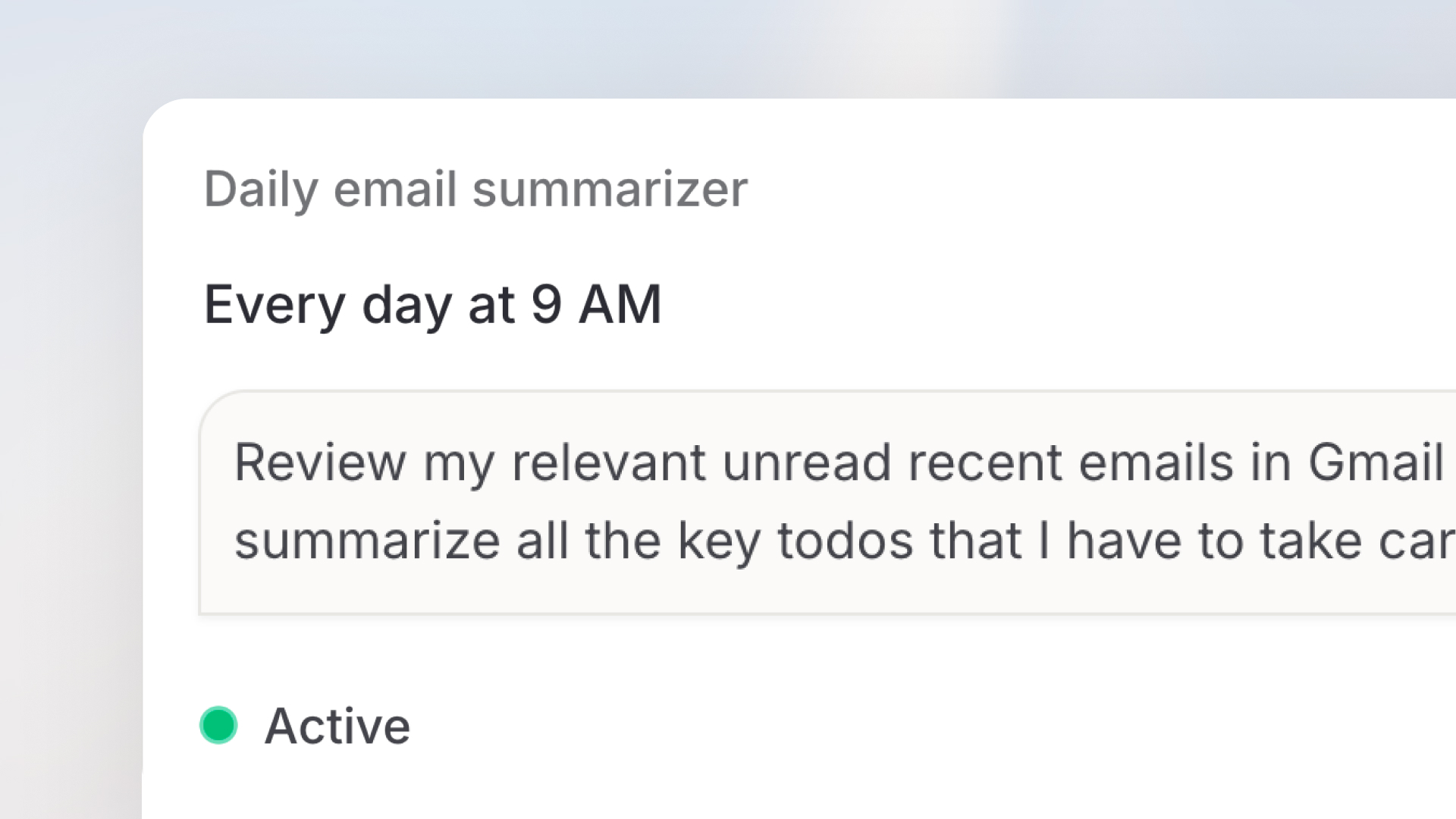
Scheduled Tasks lets you set up a prompt that runs automatically on a schedule you define. Combine it with an agent and your integrations, and Langdock handles the rest, whether that’s a daily briefing, a weekly summary, or any other task you'd otherwise do manually on a regular basis.
What's new
Recurring prompts on your schedule
Create a scheduled task by writing a prompt, choosing an agent, and deciding when it should run. Schedules can be set to run daily, weekly, or at a custom cadence. Each run automatically starts at the time you set, in your local timezone.
Powered by your agents and integrations
Scheduled tasks can run through any agent you've already configured in Langdock. Your daily Slack digest, weekly CRM summary, or automated report can all pull live data from the integrations your agent already has access to.
A dedicated place for all your scheduled tasks
A new Scheduled section in the sidebar gives you a central place to see, manage, and monitor all your tasks. You can see the active tasks directly in the sidebar, so you always know what's running in the background.
See previous run history
You can review past runs, see what the agent produced, and adjust the configuration if needed.
Pause and resume anytime
You can easily pause tasks with one click. Paused tasks are clearly marked and won't continue until you restart them.
How to get started
- Go to “Scheduled” in the sidebar
- Click “New task”
- Write your prompt: describe exactly what you want the task to do
- Choose an agent (optional)
- Set your schedule: pick the frequency it should run
- Save: your task will run automatically from that point on
Example schedules to get you started
Here are a few ideas to help you schedule your first task:
- Daily standup prep: Every weekday at 8:30 AM, pull your open Jira tickets, recent GitHub PRs, and Slack mentions into a concise "here's what I'm working on today" summary, ready before your standup starts.
- Weekly competitive pulse: Every Monday morning, scan a set of competitor blogs, product pages, or news sources and deliver a short briefing on what changed: new features, pricing updates, announcements.
- End-of-week team digest: Every Friday at 4 PM, summarize the week's closed tickets, merged PRs, and key decisions from Notion or Confluence into a digest you can paste straight into your Teams channel.
- Daily CRM hygiene check: Each morning, flag any deals in your CRM that haven't had activity in over a week, and draft a short follow-up message for each one, ready for you to review and send.
- Monday metrics briefing: Pull last week's key numbers from your analytics tool or data warehouse and format them into a short report with highlights and anything that looks off.
- Async meeting prep: The night before a recurring meeting, gather the latest updates from relevant Confluence pages, Google Docs, or Notion pages, and draft a pre-read.
- More subagent steps per run: Chat subagents can now execute significantly more steps per run, enabling more complex, multi-step agent tasks to complete successfully.
- Re-authenticate integrations from settings: You can now re-authenticate existing integrations directly from the connection settings, without needing to remove and re-add them.
- Request access for private agents: Users who try to open an agent they do not have access to will now see a "Request access" button.
- Truncated output notice for large responses: When an integration action returns a very large response, you now see a clear notice indicating that the output has been truncated, so you always know when results may be incomplete.
- Subagents as tools via API: Agents accessed via the API can now use attached sub-agents as tools, enabling more powerful and composable agent workflows through the Agent API.
- Larger video uploads: You can now upload video files up to 100 MB, previously limited to 20 MB, for transcription and processing.
- Selectable download format for markdown files: You can now choose which file format to download when clicking the download button on markdown files in chat.
- Correct formula rendering across models: Mathematical formulas now render correctly in chat and workflow previews across all AI models, including the mobile app.
- Saved Library sorting and filtering preferences: Your sorting and filtering preferences in the Library are now saved automatically, so your view stays consistent across sessions and page reloads.
- Workflow node rename detection: Renaming nodes in a workflow draft is now correctly recognized as a change, so the deploy panel will properly display the diff and allow deployment.
- Branch name shown first in workflow conditions: Condition rows in workflows now display the branch name first, so renamed branches stay clearly labeled even in prompt mode.
- Smarter workflow AI assistant for triggers: The workflow AI assistant now understands trigger input field descriptions, making it significantly more helpful when configuring trigger parameters in the workflow builder.
Context window breakdown
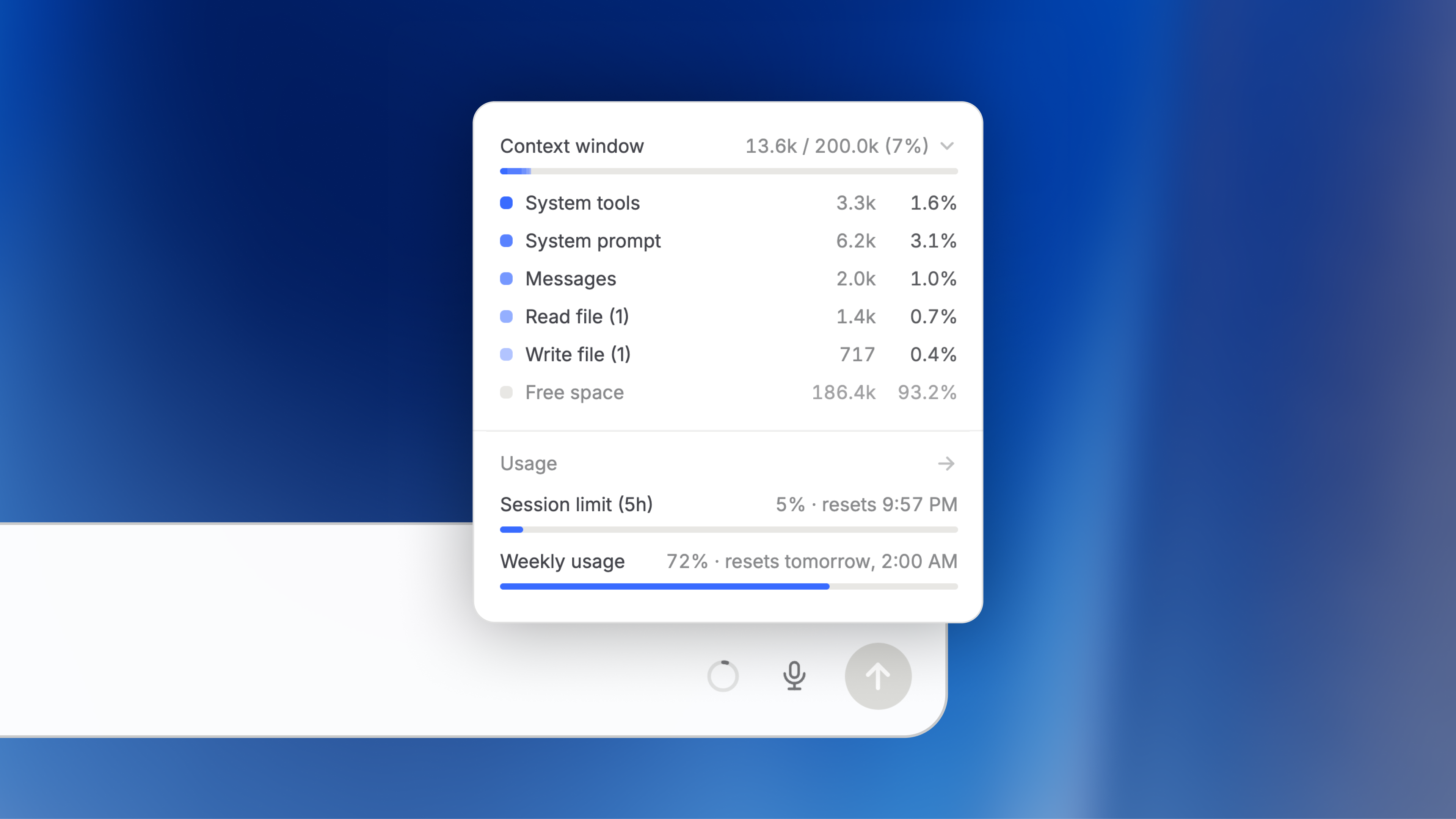
We are introducing a context window indicator directly in the chat input bar, so you can see exactly how much of a model's context is being used, and what is using it.
Why we built this
Every AI conversation has a capacity limit (called the context window), a fixed amount of information the model can work with at any one time. As conversations grow, older messages are automatically summarized to free up space. Until now, there was no easy way to see how full the context window was or what was actually filling it up. This feature gives you visibility into what's going on behind the scenes and how much of the context window each part of the conversation uses.
What you can see
The indicator sits in the chat input bar and shows your current context window usage, for example, 13.6k / 200.0k (7%). You can click it to open a detailed breakdown.
The breakdown groups context usage into the following categories:
- System tools: tools available to the model in this chat
- System prompt: core instructions for the model
- Messages: the visible conversation between you and the model
- Tools: the built-in or integration actions performed in the chat
- Attachments/images: files and images you have added to the chat
- Skills: active skill descriptions available to the model
- Memory: saved memories included in the chat
- Autocompact summary: a summary of earlier messages
- Free space: how much context remains available
Each category shows a token count (the unit AI models use to measure text), a percentage, and a position in a stacked visual bar.
You can find more information about this in our documentation.
We would love to hear how this works for you 🙌
- Skill sharing notifications: Users now receive an inbox notification when a skill is shared with them, making it easier to discover and access newly shared skills.
- Extended thinking on mobile: Mobile app users can now enable extended thinking for supported reasoning models directly from the model selector.
- Longer agent system prompts: Agents now support system prompts of up to 50,000 characters, allowing you to create more detailed and comprehensive agent instructions.
- Native tool search for latest models: Agents using the latest OpenAI (GPT-5.4+) and Anthropic (Sonnet/Opus 4+) models now benefit from improved tool discovery and selection through native tool search.
- Feedback version tracking and filtering: Agent editors can now see which agent version each piece of feedback was submitted on and filter the feedback analytics page by version.
- Shareable feedback link: Agent editors can now copy a direct link to an agent's feedback dialog from the chat header menu, making it easier to collect targeted feedback.
- Automated feedback prompts: Users who have had more than 5 conversations with an agent are now prompted with a feedback banner to help collect actionable input for the agent editors.
- Expanded dictation language support: Additional languages including Polish are now supported for speech dictation and audio transcription.
- Auto-hiding quick-action pills: The quick-action pills below the chat input now automatically hide while you type and reappear when you clear your input, keeping the chat interface clean and focused.
Claude Opus 4.8
Anthropic's Claude Opus 4.8 is now available on Langdock! 🚀
Today, we are adding Claude Opus 4.8 to Langdock. It builds on Opus 4.7 with improvements across benchmarks and is Anthropic's strongest model for long-running agentic tasks. It is designed to be a more effective collaborator: it carries context better, catches its own mistakes, and pushes back when a plan doesn't sound right.
You can read more about the launch in Anthropic's official announcement.
The model is hosted in the EU and available to all workspaces now.
To get you started quickly, we have automatically enabled Opus 4.8 in all workspaces where another Opus version was previously activated. Admins can manage model access in workspace settings.
Gemini 3.5 Flash
Google's Gemini 3.5 Flash is now available on Langdock! 🚀

Today, we are adding Gemini 3.5 Flash to Langdock. It is Google's fastest and most capable Flash model yet, built for agentic tasks, coding, and multimodal work.
You can read more about the launch in Google's official announcement.
The model is hosted in the EU and available to all workspaces now. You can also enable "Thinking" directly in the model dropdown for complex tasks that benefit from deeper reasoning.
To get you started quickly, we have automatically enabled Gemini 3.5 Flash in all workspaces where a previous Gemini model was activated. Admins can manage model access in workspace settings.
New Document Editor
We've launched a new document editor in Langdock: a redesigned way to write, edit, format, and collaborate with AI on documents, right next to your chat.

From Canvas to a real document editor
We've built a completely new document editor, integrated directly into the chat, that replaces the previous Canvas functionality. The core experience stays the same. The main shift is moving from a canvas toward creating real documents.
With the recent launches of Skills, Templates, and Library, we began introducing a new way of working with files in Langdock. The shift from "Canvas" to "Creating Documents" is also the foundation for further enhancements in the coming weeks, focused on working with files and folders more naturally in Langdock.
What's new
Create documents naturally
Click the "Create document" button (previously "Canvas") or just describe what you want in chat (e.g., "write me a guide on X", "draft a proposal"). Langdock will spin up a new document and start drafting right alongside you.
Refreshed design and richer formatting
A clean interface with all the formatting options you'd expect: headings, lists, quotes, code blocks, bold, italic, underline, strikethrough, and inline links. Switch to full-screen view when you want to focus on the document, or keep the chat alongside as you work.
Save to SharePoint, OneDrive, and Google Drive
Send finished documents straight from the editor to your connected tools, so they land where the rest of your work already lives. No more download-then-upload.
Hand in hand with the Library
Documents you create in Langdock now live in your Library and can be opened and edited there, not just in the chat where they were created. Head to your Library, open any document, and pick up where you left off.
Version history
Every update, whether made by you or the AI, is saved as a new version. Browse the full history, preview older versions, and restore any of them with a click.
Note: editing currently supports Langdock documents only, not Word or PDF files.

What happened to the old Canvas?
The old Canvas is now fully replaced by the new document editor, which covers what Canvas did and adds quite a bit on top. Any existing Canvas documents remain accessible in the original chats where they were created. Good to know: for a smoother transition, Langdock still recognizes "Canvas" in prompts and opens the new document editor.
Start a new chat, click on "Create document", and give it a try.
We can't wait to hear what you think! 🙌
- Page previews and citations for Word and PowerPoint files: DOCX, PPTX, DOC, and PPT files now support per-page previews and accurate page citations when attached in chat. Click any citation to view the file directly, matching the experience previously available only for PDFs.
- Smarter skill creation from chat: When you create a skill from chat that already exists, Langdock now automatically updates it instead of creating a duplicate, with clear status feedback directly in the chat.
- Cleaner integration reauthorization: When a connected integration loses authentication, you now see a clear in-chat prompt to reauthorize, and any failed requests are automatically retried once the connection is restored.
- Smoother citation rendering during streaming: Source citations and links now fade in smoothly during streaming, eliminating the brief flash of raw link text that previously appeared while a response was being generated.
- Paste links directly in the file picker: The file picker search field now clearly indicates that you can paste a link directly, making it easier to attach files via URL.
- Full-text chat search: Chat search now finds conversations by both title and message content across your entire history, with accurately ranked results and a clear "No results" state when nothing matches.
- Sidebar remembers its state: Your sidebar navigation now remembers whether you left it open or closed, keeping your layout preference consistent as you navigate across pages.
- Richer file metadata in workflows: Workflow "Search Files" nodes and knowledge folder tools now return richer file metadata, including file ID, external ID, connection ID, file size, and page count, giving you more data to work with in downstream steps.
- Extended thinking on workflow Agent nodes: You can now enable extended thinking directly on Agent nodes in the workflow builder, and your choice is saved and applied when the workflow runs.
- SharePoint page links in chat: You can now paste SharePoint site page links (.aspx) directly into chat or agent knowledge, and they'll automatically resolve as attachments. No more manual workarounds for referencing SharePoint content.
- Extended thinking in the Agents API: The Agents API now supports an extendedThinking parameter, letting you enable extended reasoning on supported models. The Models API exposes a new supportsExtendedThinking field to help identify compatible models.
Auto model mode
Auto is our new model routing option that automatically selects a suitable model for your task.

Instead of manually choosing between different models for every prompt, Auto analyzes the first message of a conversation to understand the request and estimate its complexity. Based on that initial assessment, it selects a model for the rest of the conversation.
The goal is not to replace manual model selection entirely. You can still switch to other models at any point in a conversation. Auto is designed primarily for everyday work: quick questions, drafting, summarizing, rewriting, analysis, and other common tasks where you should not have to think about which model is suitable.
By taking away this small but frequent model-choice decision, Auto helps you work faster and make better use of your usage limits by avoiding costly models for simpler tasks. We will continue to improve the routing logic over time, expand the available model choices, and use feedback from users to make the experience more accurate and flexible.
Usage transparency in the model selector
We've added a usage bar directly in the model selector, so you can see at a glance how much usage roughly each model consumes. This makes it easier to understand your limits, make informed model choices, and get the most out of Langdock.

- Simplified Reasoning Model Toggle: Reasoning models now have a simple on/off toggle, replacing the previous approach of separate model entries. Switching between standard and reasoning mode is now cleaner and more intuitive.
- Templates in Agents: You can now attach and use document templates directly inside agents, making it easier to standardize outputs and give agents a consistent starting point for document generation.
- Improved File Handling: We've made significant improvements to how Langdock reads and processes files. Documents are now handled more reliably and accurately across a wider range of file types and sizes.
- More robust template uploads: Template uploads are now more resilient: edge cases that previously caused failures have been addressed, making the experience smoother and more dependable.
- Agent feedback nudge: Users will now receive a nudge to leave feedback for the agent they are using, helping agent owners iterate and improve their agents over time.
- React icons support in presentation generation: Our PPTX generation now supports React Icons, unlocking a much wider range of icons for use in AI-generated slides.
- Filter agent feedback by version: You can now filter agent feedback by the version it was submitted against. This makes it much easier to track how changes to your agent affect user satisfaction over time.
GPT-5.5
OpenAI's GPT‑5.5 is now available on Langdock! 🚀
Today, we are adding GPT‑5.5 to Langdock. It's OpenAI's smartest model yet and brings improved understanding of intent and the ability to plan, research, and work through complex tasks on its own.
You can read more about the launch in OpenAI's official announcement.
The model is hosted in the EU and available to all workspaces now.
To get you started quickly, we have automatically enabled GPT‑5.5 in all workspaces where GPT‑5.4 was previously activated. Admins can manage model access in workspace settings.
Agent Versioning and Analytics
Agents now support versioning and richer analytics, giving builders full control over when changes go live and deeper insight into how their agents are used.
Agent Versioning
Agents now have versions, so you can iterate with confidence and never lose a working configuration.
When you edit an agent, your changes are saved as a private draft that only you can see. Nothing goes live until you're ready. When you click "Update" in the top right of the screen, your draft is published as a new version, instantly available to everyone with access to the agent.
What's new:
- Drafts autosave as you edit: experiment freely without affecting anyone using the agent
- Publish when you're ready: a single "Update" click rolls out your changes to all users
- Every update is saved: a full version history is kept, so you can browse past versions and restore any of them at any time
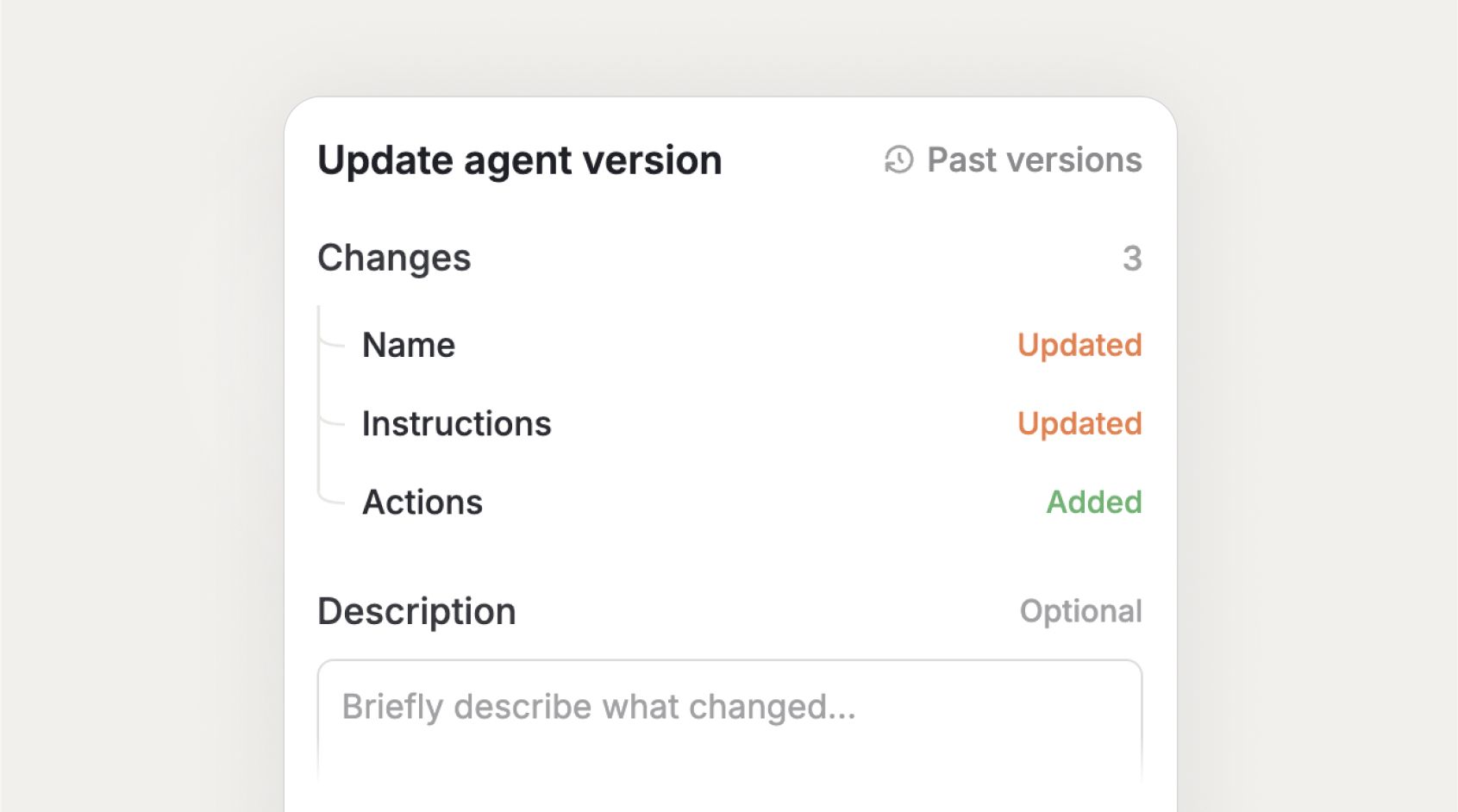
- Change summary on publish: see the difference of what exactly has changed (e.g., name updated, instructions updated, actions added), and optionally add a short description to communicate the changes
Agent Analytics
Agent owners and editors now get a much richer, more actionable view into how their agents are performing.
The analytics experience has been moved to a top-level tab inside the agent, making it significantly more prominent and easier to access. The new interface brings deeper charts and a more powerful feedback review flow, so that you can continuously improve your agents.
What's new:
- Richer usage charts: get more detailed metrics on conversations, active users, and engagement over time
- Improved feedback interface: browse and filter user feedback, switch between conversations, and preview chats without leaving the analytics page
- More prominent placement: analytics accessible directly from the top navigation bar within the agent
Together, these improvements give agent builders the visibility they need to understand what's working, catch issues early, and continuously improve their agents based on real usage.
Who is this for?
Both features are available to agent owners and editors. End users of agents are unaffected; they always see the latest published version, with no visibility into drafts.
- Clickable citations when copying: When copying AI responses, source citations are now included as clickable hyperlinks, giving you direct access to referenced sources without any extra steps.
- CSV export for API costs: Admins can now export API cost breakdowns as CSV for any custom date range up to 12 months directly from settings.
- Flexible webhook authentication: Workflow webhooks now support flexible authentication methods. Choose between no authentication, query parameter, or header-based auth (X-Webhook-Secret) directly from the trigger panel.
- Improved file recognition in workflows: Uploaded files are now reliably recognized in workflow actions, even when filenames were automatically sanitized or referenced via storage URLs.
- MCP server URL fix: Valid HTTPS MCP server URLs containing query parameters are now correctly accepted.
- Shared MCP connections: Workspace members can now successfully use workspace-shared MCP connections.
Opus 4.7 & GPT Image 2
We added two new models to Langdock today: Claude Opus 4.7 and GPT Image 2. 🚀
Claude Opus 4.7 is Anthropic's latest flagship model and its most capable available model to date. It brings stronger performance across coding, vision, and complex multi-step tasks. Whether you are tackling large projects, long-running workflows, or sophisticated agents, Opus 4.7 handles them with greater precision and consistency than its predecessor. You can read more in Anthropic's official announcement.
GPT Image 2 is OpenAI's next-generation image model and a major step forward for visual generation. It delivers 2K resolution across multiple aspect ratios, significantly improved text rendering in images, and real-world knowledge updated through December 2025. You can read more in OpenAI's official announcement.
To get you started quickly, we have automatically enabled both models in all workspaces where Opus 4.6 / GPT Image 1.5 was previously activated. Admins can manage model access in workspace settings.
Library
We're introducing our Library – one central place for everything file-related in Langdock. Create new files, manage folders, browse every file you've generated or uploaded, and use file templates to keep output consistent.
Join our webinar
We will host a webinar on April 14th to walk you through our new Library. Get a firsthand introduction on how the Library works and you can use it in your day to day work. Sign up here!
Why we built this
As more teams use Langdock to create documents, presentations, and work with uploaded files, finding them again has become a common pain point. Files were tied to the conversations they were created in, and there was no single place to browse, manage, or reuse them. The Library changes that by bringing all file-related functionality into one view – so you spend less time searching.
What's in the Library
The Library includes three sections:
- Create New File – Start a new document, spreadsheet, or presentation directly from the Library. Files can be created blank or from your team's templates.
- Folders – What was previously called "Knowledge Folders" is now just called "Folders" and lives inside the Library. Same functionality, new home. Create folders, upload files, share with colleagues, and attach them to agents or reference them in chat via @mentions. All your existing folders and settings carry over automatically.
- Recent Files – Every file you've created, uploaded, or imported across all your Langdock conversations appears here. Preview files, download them, jump back to the original chat, or start a new chat with any file attached. They can now easily be moved into folders. Good to know: these files follow your workspace's chat data retention settings. When a chat is deleted, the associated files are removed as well.
File Templates
File templates let you save existing documents or slide decks as reusable starting points. Upload your company's master PowerPoint presentation, offer template, or any document that follows a consistent format – and anyone you share it with can generate new files in the same structure, layout, and style.
Upload a template from your computer or import one from a connected integration, such as Google Drive or SharePoint (supported files are .pptx, .pdf, and .docx). Langdock analyzes the file to make it ready to be used in Chat. Templates can be shared with specific users, groups, or workspace-wide.
Head to the Library in your sidebar to get started, and sign up for our Library webinar here!
- In-app file preview: When you upload or create a document in Langdock, you can now click on it which opens a preview of that file directly in the app.
- Timestamp for messages: Messages in chat now display a timestamp on hover, showing the time for today's messages or the full date and time for older ones.
- Improved model configuration: The model's settings page has been fully overhauled with tabbed navigation (All, Completion, Embedding, Image), a search bar, and provider grouping. Admins can now find, configure, and manage models significantly faster, including improved drag-and-drop reordering for BYOK setups.
- Integration reauthorize flow: When an integration connection expires or is revoked, users now see a clear alert in chat with a direct "Reauthorize" link to quickly reconnect.
- Skill sharing: Skill editors can now share skills with users and groups directly, giving them the same sharing capabilities as skill owners.
- Save files in third-party app: Users can now save chat files directly to Google Drive or OneDrive from the chat Download menu.
- Agent descriptions: Agent descriptions now render markdown formatting (headers, bold, italic, code blocks, and links) in the chat empty state and agent edit preview.