Workflows
We're excited to launch Workflows, a powerful new way to build AI-driven automations in Langdock! 🚀
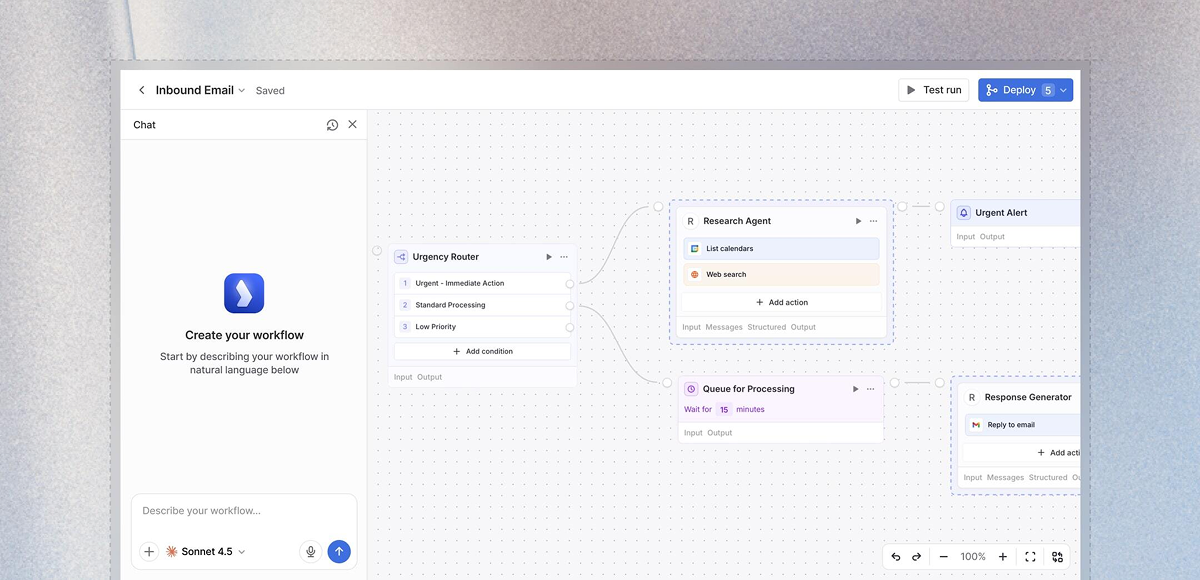
Workflows bring together everything you already use in Langdock - Chat, Assistants, and Integrations - into end-to-end automations. Think of it as your orchestration layer where you can chain multiple steps together, add conditional logic, loop through data, and create sophisticated processes that run automatically.
What are Workflows?
Workflows allow you to build complex, multi-step automations without writing code. They can be triggered by a form submission, a schedule, or an event in your connected apps and handle entire processes from start to finish-automatically and reliably.
Key capabilities:
- Multi-step automation: Chain assistants, integrations, and custom logic into sophisticated workflows.
- Flexible triggers: Start workflows manually, on a schedule, via webhook, or through form submissions.
- Conditional logic: Add deterministic if/then branches, loops, and decision trees to handle complex scenarios.
- Human-in-the-loop: Include manual approval steps when needed for critical decisions.
- AI at every step: Use different AI models throughout your workflow to analyze, decide, and adapt.
- Cost management: Monitor and control workflow spending with built-in cost limits and usage tracking.
Why Workflows?
More powerful than Chat: While Chat is perfect for interactive conversations, Workflows automate entire processes in the background. Set them up once, and they run reliably 24/7.
More flexible than Assistants: Assistants are great for specific tasks, but Workflows let you combine multiple assistants, add custom logic, integrate with external APIs, and create sophisticated decision trees.
More than Integrations: Integrations connect your apps, but Workflows orchestrate complex processes across those apps-with AI at every step.
Example use cases
- Automatically analyze and route customer support tickets based on content and urgency.
- Generate weekly reports by pulling data from multiple sources, analyzing trends, and distributing results.
- Process form submissions with AI review, conditional approval flows, and automated follow-ups.
- Monitor data sources on a schedule and trigger actions when specific conditions are met.
Getting started
Workflows are available now in Langdock! To start building:
- Workflows must be activated by an admin in workspace settings.
- Navigate to the Workflows section in your sidebar.
- Create your first workflow using our visual builder.
- Choose a trigger, add nodes, and connect your logic.
Check out our video tutorial to get started or our documentation for detailed guides.
Important notes:
- AI usage in workflows is billed via API pricing, and depending on the number of runs, you might need a subscription upgrade (pricing details here).
- Set cost limits and enable monitoring to control spending.
- All workflow executions are logged to the workflow creator for transparency and debugging.
We're excited to see what you build with Workflows! As always, we look forward to your feedback. 🙌